Slack
Receive Doksi run results and notifications in Slack channels or as direct messages.
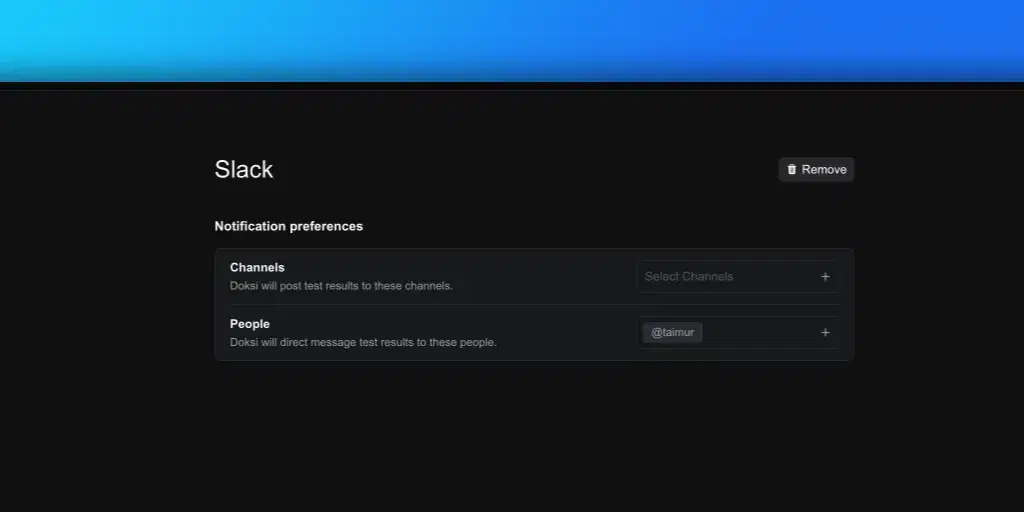
Forward run results, failures, and scheduled digests to Slack. Configure the integration under Settings > Integrations > Slack after connecting via OAuth.
Connecting Slack
- Open Settings > Integrations.
- Click Add on the Slack card.
- Authorize Doksi in the Slack workspace you want to post into.
Once authorized, Slack moves to the Connected section.
Channels
Add Slack channels to receive run notifications.
- Open Settings > Integrations > Slack.
- Click Add Channel.
- Select the channel from your workspace.
- Choose which events to notify on.
Events include run failures, run completions, and scheduled digests. A channel can subscribe to any combination.
Users
Add individual Slack users to receive direct-message notifications. Useful for on-call rotations or routing failures to the person who triggered the run.
- Click Add User.
- Select the user from your workspace.
- Choose which events they should receive.
Removing the integration
Open the Slack integration and click Remove. All channel and user subscriptions are removed and no further notifications are sent.
CI/CD
Trigger Doksi test runs from your CI/CD pipeline. Configure API keys and policies from Settings > Integrations > CI/CD.
Create a run
Creates a run from a matrix of entries, each pairing a target with a set of tests and authentication settings. Returns immediately with a `run_id`. Poll `GET /runs/{run_id}` until the run completes.